
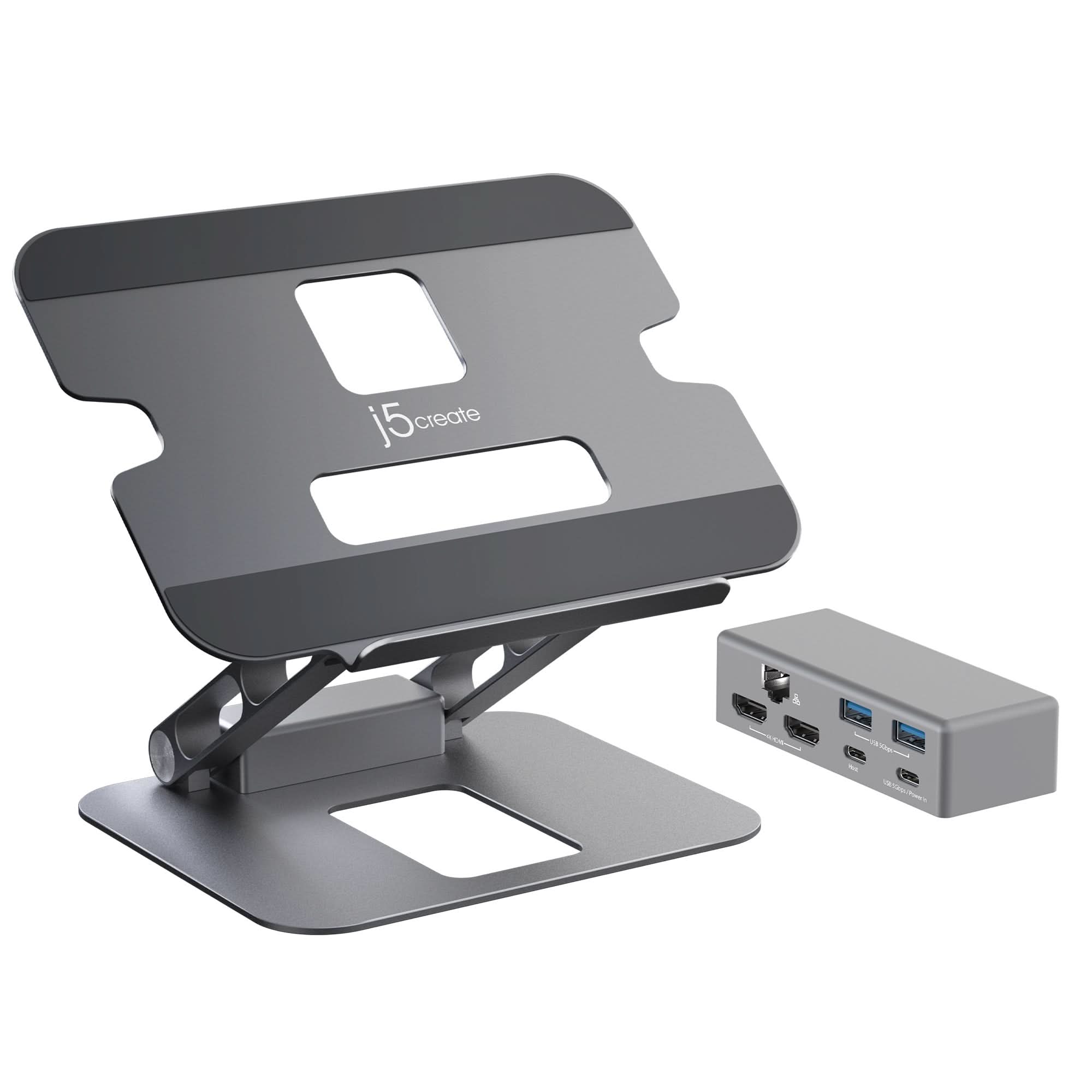


J5CREATE MULTI-ANGLE DUAL HDMI DOCKING STAND
If you have any questions, you are always welcome to contact us. We'll get back to you as soon as possible, within 24 hours on weekdays.
-
Shipping Information
Use this text to answer questions in as much detail as possible for your customers.
-
Customer Support
Use this text to answer questions in as much detail as possible for your customers.
-
FAQ’s
Use this text to answer questions in as much detail as possible for your customers.
-
Contact Us
Use this text to answer questions in as much detail as possible for your customers.
Elevate your workspace with the J5CREATE MULTI-ANGLE DUAL HDMI DOCKING STAND. This versatile aluminum stand provides adjustable viewing angles and heights, reducing eye strain and improving posture. Its integrated USB-C® mini dock expands your connectivity, offering display outputs, network access, and multiple USB ports, making it ideal for creating an efficient and productive desktop or standing desk setup.
Key Features at a Glance
- Durable aluminum construction supports laptops up to 16 inches and 9 lbs. (4 kg).
- Adjustable viewing angles and heights for improved ergonomics.
- Foldable design ensures easy storage and portability.
- Integrated USB-C® mini dock with 4K HDMI™ or dual 1080p HDMI™ output.
- Features Gigabit Ethernet and multiple USB™ 5Gbps ports.
- USB-C® port supports 5Gbps data transfer and up to 100W power pass-through.
Ergonomic Design & Versatility
Crafted from durable aluminum, this multi-angle stand is built to support a variety of items, from most laptops up to 16 inches and 9 lbs. (4 kg), to tablets and books. Its adjustable viewing angles and heights are designed to help reduce eye strain and improve posture, making your long work sessions more comfortable. When not in use, the foldable design allows for convenient storage or transport.
Seamless Connectivity Hub
The integrated USB-C® mini dock provides all the essential ports needed for enhanced productivity. Easily create a workstation with a Gigabit Ethernet port for reliable network access, two USB™ 5Gbps Type-A downstream ports for peripherals, and a USB-C® port that supports both 5Gbps data transfer and up to 100W power pass-through to charge your device while in use.
Enhanced Display Capabilities
Connect to external monitors with the flexibility of one 4K HDMI™ or dual 1080p HDMI™ display outputs. This functionality is supported on compatible USB-C® laptops with DisplayPort™ 1.2 alt mode and MST. Whether you have a Thunderbolt™ 3/4 or USB-C® laptop with DP™ Alt mode, this stand allows you to expand your visual workspace for greater efficiency.
Technical Specifications
| Hardware | |
|
Warranty |
2-Year Limited |
|
Number of Tiers |
N/A |
|
Adjustable Angle |
N/A |
|
Maximum Weight Capacity |
9 lbs. (4 kg) |
|
Additional Storage |
No |
|
Assembly Required |
No |
|
Docking Station Included |
Yes |
|
Host Connector |
1 - USB-C® Female |
|
Video Output |
2 - HDMI™ Female |
|
Power Source |
Bus-powered or self-powered |
|
Network Interface |
Yes |
|
Audio Supported |
Yes |
|
Ports |
1 - USB-C® 5Gbps (Data transfer & Power Delivery 3.0) 2 - USB™ 5Gbps Type-A 2- HDMI™ (4K for Single display, 1080p for Dual display) 1 - Gigabit Ethernet |
| Performance | |
|
Maximum Display Resolution |
3840 x 2160 |
|
Maximum Display Refresh Rate |
4K @ 30 Hz |
|
Displays Supported |
2 |
|
Wide Screen Supported |
Yes |
|
Audio Channel |
2.1 via HDMI™ |
| Power | |
|
Power Delivery |
Up to 100W |
|
Power Consumption |
≤ 900 mA |
|
Input Current |
Up to 5A |
|
Input Voltage |
Up to 20V |
|
Output Current |
Up to 4.5A |
|
Output Voltage |
Up to 20V |
| Physical Specifications | |
|
Color |
Space Grey |
|
Stand Material |
Aluminum |
|
Enclosure Type |
Aluminum |
|
Cable Length |
23.6 in. (60 cm) |
|
Product Height |
11.4 in. (290 mm) |
|
Product Width |
8.9 in. (226 mm) |
|
Product Depth |
2.08 in. (53 mm) |
|
Product Weight |
≈ 2.89 lbs. (1.31 kg) (including cable) |
|
Operating Temperature |
30 to 116°F (0 to 30°C) |
|
Operating Humidity |
< 85% non-condensing |
|
Storage Temperature |
0 to 155°F (-10 to 65°C) |
|
Storage Humidity |
< 85% non-condensing |
System Requirements & Notes:
- Requires an available USB-C® port supporting DisplayPort™ alt mode and USB™ Power Delivery 2.0 or 3.0.
- DisplayPort™ v1.2 on graphics card/video source is needed for 4K resolution @ 30 Hz.
- Host device must support Multi-Stream Transport (MST) and DisplayPort™ 1.2 for dual-monitor configuration.
- macOS® only supports SST (mirrored displays), not MST.
- A 4K-capable display and cable are required for 3840 x 2160 resolution.
- Performance may be limited if connected to a USB™ 2.0 host port or using a USB™ 2.0 host cable.
- For optimal performance with high-powered USB devices, attach a USB-C® power adapter to the power delivery port.
- Do not remove the USB-C® power adapter while copying files.
- It is advised to connect no more than one (1) bus-powered/portable external hard disk drive to the USB™ hub at a time.
Frequently Asked Questions
Q: What is included in the package?
A: The package includes one JTS427 Multi-Angle Dual HDMI™ Docking Stand, one USB-C® 3.2 male to male host cable, and a Quick Installation Guide (QIG).
Q: What are the primary system requirements for using the docking stand's display features?
A: Your device needs an available USB-C® port that supports DisplayPort™ alt mode and USB™ Power Delivery 2.0 or 3.0. For 4K resolution, DisplayPort™ v1.2 is required on the graphics card or video source.
Q: Are there any special considerations for optimal performance or connectivity?
A: For optimal performance with high-powered USB devices, attach a USB-C® power adapter. Do not remove the USB-C® power adapter during file copies. Using a USB™ 2.0 host port or cable may limit performance, and macOS® only supports mirrored displays (SST) rather than extended displays (MST).
