
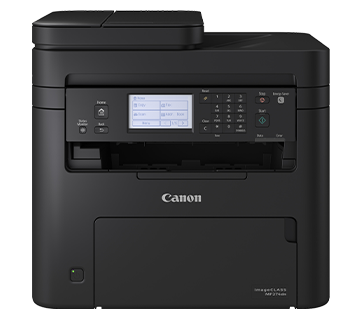
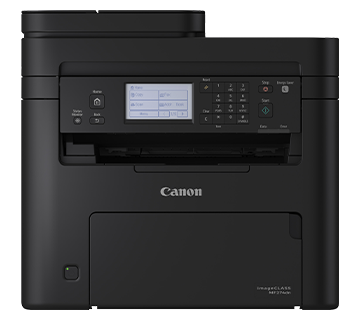


Canon imageCLASS MF274dn 4 in 1 Monochrome Multifunction for Home and Small Offices
If you have any questions, you are always welcome to contact us. We'll get back to you as soon as possible, within 24 hours on weekdays.
-
Shipping Information
Use this text to answer questions in as much detail as possible for your customers.
-
Customer Support
Use this text to answer questions in as much detail as possible for your customers.
-
FAQ’s
Use this text to answer questions in as much detail as possible for your customers.
-
Contact Us
Use this text to answer questions in as much detail as possible for your customers.
The Canon imageCLASS MF274dn 4 in 1 Monochrome Multifunction printer is engineered for the demands of home and small office environments. This versatile device offers seamless network connectivity, boosting your daily productivity with its integrated auto document feeder and intuitive LCD touchscreen panel for effortless navigation.
Key Features at a Glance
- 4-in-1 multifunction capabilities: print, copy, scan, and fax.
- Designed for home and small office use.
- Monochrome laser printing for crisp, clear documents.
- Features an auto document feeder for enhanced productivity.
- Intuitive LCD touchscreen panel for easy operation.
- Offers seamless network connectivity.
Enhanced Productivity
Boost your workflow with the integrated auto document feeder. This feature allows for efficient handling of multi-page documents, saving you valuable time on scanning, copying, and faxing tasks.
Seamless Navigation
Experience straightforward control and operation with the intuitive LCD touchscreen panel. Easily access functions and settings, making your printing experience smooth and hassle-free.
Versatile 4-in-1 Functionality
Consolidate your office equipment with this all-in-one monochrome multifunction device. Print, copy, scan, and fax from a single machine, providing comprehensive capabilities for your daily document needs.
Effortless Network Connectivity
Connect your device to your network with ease for shared access and convenient printing from multiple computers. Enjoy seamless integration into your home or small office setup.
Technical Specifications
| Printing Method | Monochrome Laser Beam Printing |
| Print Speed *1 | |
| A4 | 29 pages/minute |
| Letter | 30 pages/minute |
| 2-Sided | 18 pages/minute (A4) / 19 pages/minute (Letter) |
| Print Resolution | 600 x 600 dpi |
| Print Quality with Image Refinement Technology | 2,400 (equivalent) x 600 dpi |
| Warm-Up Time (From Power On) | 7.5s |
|
First Print Out Time (FPOT) *1 (Approx.) |
|
| A4 | 5.4s |
| Recovery Time (From Sleep Mode) | 3.2s |
| Print Language | UFR II |
| Auto Duplex Print | Yes |
| Print Margins | Top/Bottom/Left/Right margin: 5 mm Top/Bottom/Left/Right margin: 10 mm (Envelope) |
Copy
| Copy Speed *1 | |
| A4 | 29 pages/minute |
| Copy Resolution | 600 × 600 dpi |
| First Copy Out Time (FCOT) (Approx.) Platen Glass |
|
| A4 | 7.6s |
| First Copy Out Time (FCOT) (Approx.) ADF |
|
| A4 | 8.9s |
| Maximum Number of Copies | Up to 999 copies |
| Reduce/Enlargement | 25 - 400% in 1% increments |
| Copy Features | Collate, 2 on 1, 4 on 1, ID Card Copy, Passport Copy |
Scan
| Scan Resolution | |
| Optical | Up to 600 x 600 dpi |
| Driver Enhanced | Up to 9,600 x 9,600 dpi |
| Scan Type | Colour Contact Image Sensor |
| Maximum Scan Size | |
| Platen Glass | Up to 216 x 297 mm |
| Auto Document Feeder | Up to 216 x 356 mm |
| Scan Speed *2 | |
| Platen Glass | 3.5s or less |
| Auto Document Feeder | 20 images/minute (ipm) (mono), 15 images/minute (ipm) (colour) |
| Colour Depth | 24-bit |
| Pull Scan | Yes, USB and Network |
| Push Scan (Scan To PC) with MF Scan Utility | Yes, USB and Network |
| Scan To Cloud | MF Scan Utility |
| Scan Driver Compatibility | TWAIN, WIA |
Fax
|
Modem Speed |
Up to 33.6 Kbps (Up to 3s/page) |
|
Fax Resolution |
Up to 200 x 400 dpi |
|
Compression Method |
MH, MR, MMR, JBIG |
|
Memory Capacity *3 |
Up to 256 pages |
|
Speed Dials |
Up to 104 dials |
|
Group Dials / Destinations |
Maximum 103 dials / Maximum 50 destinations in one group |
|
Sequential Broadcast |
Maximum 114 destinations |
|
Receive Mode |
Fax only, Fax/Tel Auto Switch, Answer Mode, Manual |
|
Memory Backup |
Permanent fax memory backup |
|
Fax Features |
Fax Forwarding, Remote Reception, PC Fax (Transmit only) DRPD, ECM, Auto Redial, Fax Activity Reports, Fax Activity Result Reports, Fax Activity Management Reports |
Paper Handling
| Input Tray Capacity (Plain Paper, 80 g/m² (gsm)) |
|
| Standard | |
| Paper Tray | 150 sheets |
| Auto Document Feeder | 35 sheets |
| Output Tray Capacity (Plain Paper, 80 g/m² (gsm)) |
100 sheets |
| Media Size | |
|
Paper Tray |
A4, A5, A6, B5, Legal, Letter, Executive, Statement, Foolscap, Government Letter, Government Legal, Indian Legal, Index Card, Postcard, Envelope (COM10, Monarch, DL, C5), |
|
Auto Document Feeder |
A4, B5, A5, B6, Letter, Legal |
|
2-Sided Printing |
A4, Legal, Letter, Foolscap, Indian Legal, |
| Media Type | Plain Paper, Recycled Paper, Label, Postcard, Envelope |
| Media Weight | |
|
Paper Tray |
60 - 163 g/m² (gsm) |
|
Auto Document Feeder |
50 - 105 g/m² (gsm) |
Connectivity & Software
| Standard Interfaces | |
| Wired | USB 2.0 High Speed, 10Base-T/100Base-TX |
| Network Protocol | |
| LPD, RAW, WSD-Print (IPv4, IPv6) | |
| TCP/IP Application Services | Bonjour(mDNS), DHCP, BOOTP, RARP, Auto IP (IPv4), DHCPv6 (IPv6) |
| Management | SNMP v1/v3 (IPv4, IPv6), HTTP/HTTPS, SNTP |
| Network Security | |
| Wired | IP/Mac Address Filtering, HTTPS, SNMPv3, IEEE802.1X, TLS 1.3 |
| Mobile Solution | Canon PRINT Business, Canon Print Service, Apple® AirPrint®, Mopria® Print Service, Microsoft Universal Print |
| Compatible Operating Systems*4 | Windows®, Windows Server®, Mac® OS, Linux, Chrome OS |
| Software Included | Printer Driver, Fax Driver, Scanner Driver, MF Scan Utility, Toner Status |
General
| Device Memory | 256 MB |
| Display | 9.3cm (6-Line) LCD Touchscreen |
| Power Requirements | AC 220 - 240 V, 50/60 Hz |
| Power Consumption (Approx.) | |
| Operation | 530 W (maximum 1,300 W) |
| Standby | 5.8 W |
| Sleep | 1.0 W |
| Operating Environment | |
| Temperature | 10 - 30°C |
| Humidity | 20 - 80% RH (no condensation) |
| Monthly Duty Cycle*5 | 20,000 prints |
| Dimensions (W x D x H) (Approx.) | 390 x 374 x 368 mm |
| Weight*6 (Approx.) | 11 kg |
| Toner Cartridge*7 | |
| Standard | Cartridge 071: 1,200 prints (Bundled: 700 pages) |
| High | Cartridge 071H : 2,500 prints |
Frequently Asked Questions
Q: What kind of printer is the Canon imageCLASS MF274dn?
A: It is a 4-in-1 monochrome multifunction laser printer, capable of printing, copying, scanning, and faxing.
Q: Who is this printer designed for?
A: The Canon imageCLASS MF274dn is ideal for use in home and small office environments, offering essential features for daily document management.
Q: What features make this printer easy to use?
A: It includes an intuitive LCD touchscreen panel for simple navigation, an auto document feeder for efficient handling, and seamless network connectivity for convenient sharing.
